Skip to content
macOS 14+ · Apple silicon / Intel

FindDiskKiller

See what keeps using your disk.

FindDiskKiller はアプリのディスク I/O、AI Agent ストレージ、ファイル活動、ドライブの健全性を一つの macOS ワークスペースにまとめ、不要な Codex と Claude の会話を安全に確認できます。

App Activity: CPU, disk read/write, network download/upload — per process, sortable columns, adjustable widths. Four dimensions at once.

100%

Local Processing

0

Data Uploaded

macOS 14+

Supported

10

Languages

Everything in one workspace

アプリ活動、AI Agent ストレージ、ファイル、デバイス、健全性を一つのワークスペースで確認できます。

AI Agent ストレージ

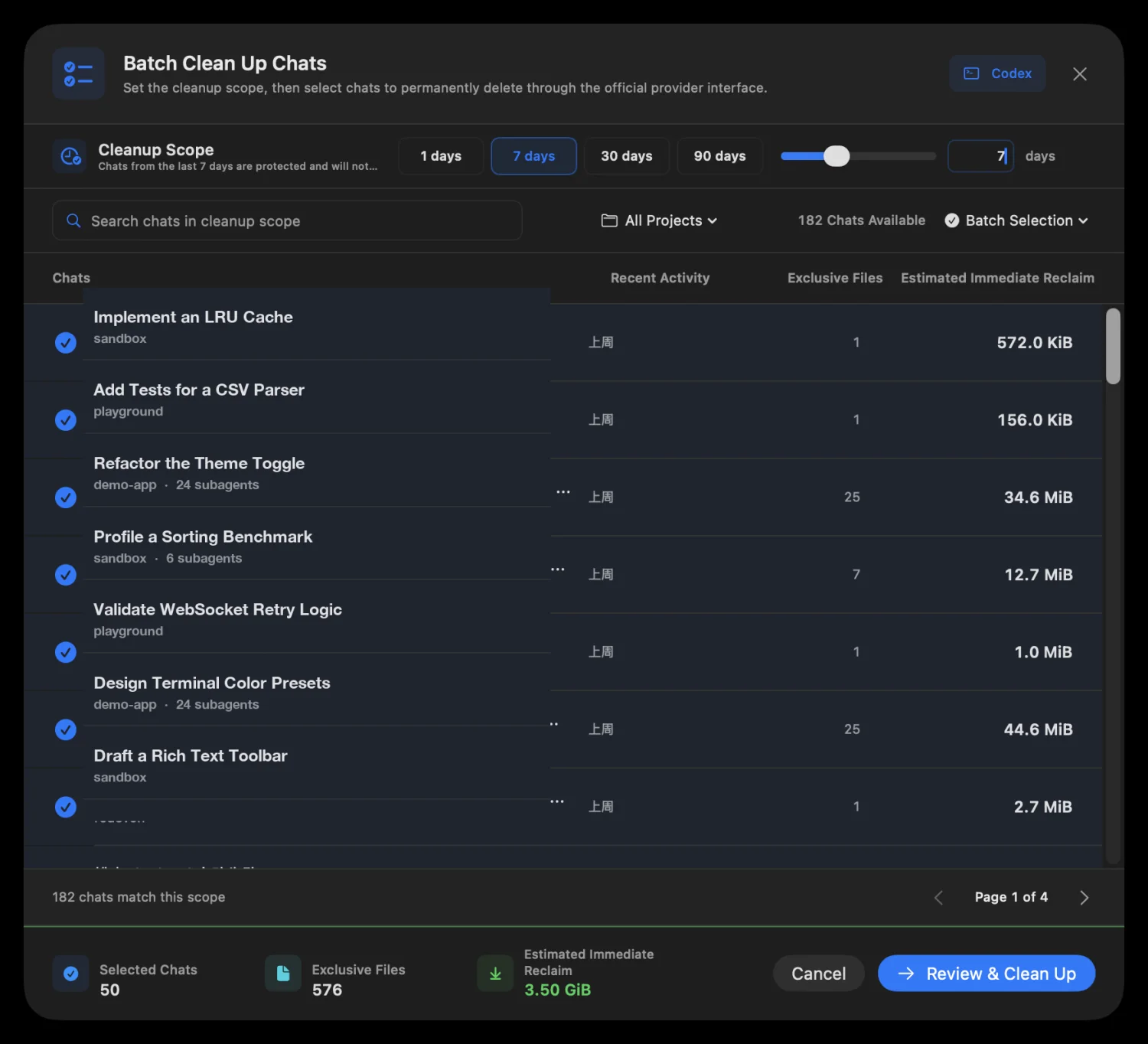
明示的な操作で Codex と Claude のストレージをローカル分析し、使用量を thread/session ごとに割り当て、対応する公式 provider 機能で古い会話を完全削除する前に確認します。
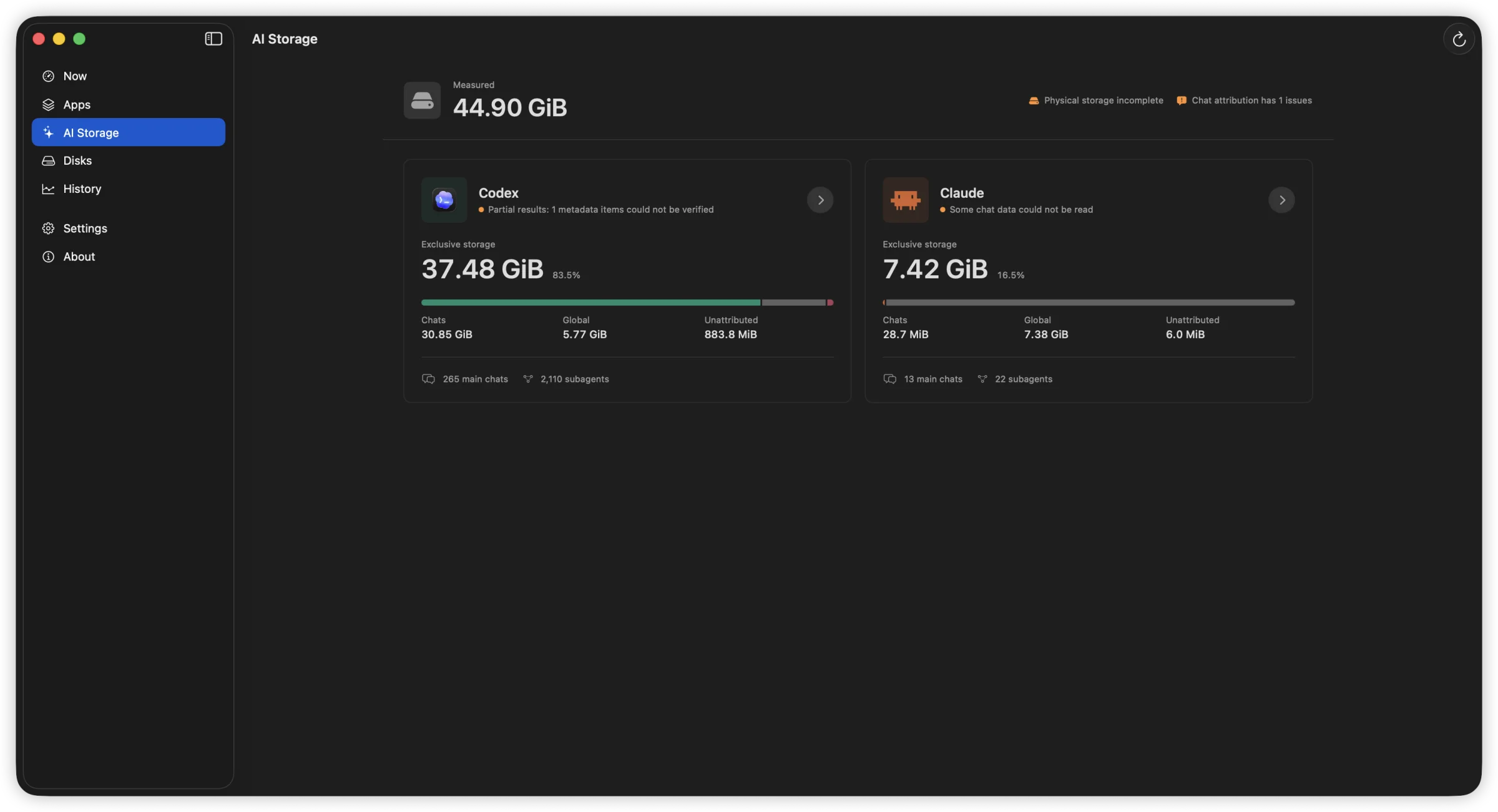
Codex と Claude のチャット、グローバル、未割り当て領域を分けて示す AI Storage の概要。
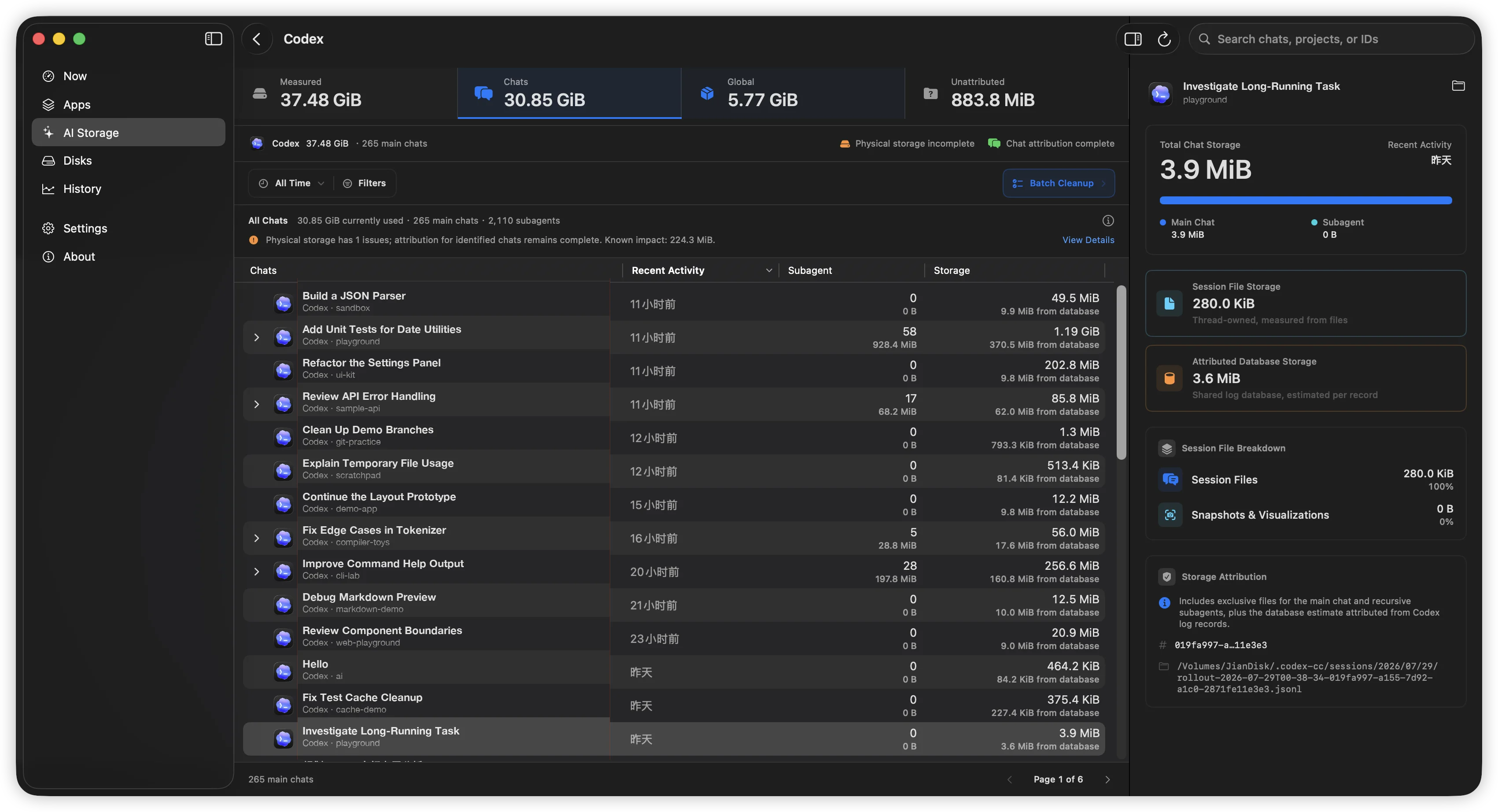
thread ごとの活動とサブエージェントを一覧表示し、選択した thread の完全なストレージ内訳を右側に示す Codex AI Storage。
完全削除前に選択した会話と即時解放見込みを示す一括クリーンアップ確認。

分析は自動で始まりません。使用中または identity が変化したセッションはスキップし、非対応 provider でデータベース書き込みや transcript の手動削除にフォールバックしません。Claude Desktop と Cowork は Claude Desktop 内で削除します。

App Activity

CPU, disk read/write, network download/upload — per process, sortable columns, adjustable widths. Four dimensions at once.

App Activity: 1-min, 15-min, and 1-hour line charts. Hover for exact values. Spot sustained patterns, not just momentary spikes.

File Activity

Open file locations, recently modified directories, and on-demand access tracing — start tracing any path to see who reads or writes it.

Open file locations, recently modified directories, and on-demand access tracing — start tracing any path to see who reads or writes it.
File Activity: Guided workflow into targeted per-file tracing

Disks & Volumes

Device throughput shown with familiar names — Macintosh HD, JianDisk — not cryptic identifiers. See which device is busy.

Temperature, lifetime reads/writes, wear level, spare capacity, power-on hours — only showing fields your hardware actually reports.

Device throughput shown with familiar names — Macintosh HD, JianDisk — not cryptic identifiers. See which device is busy.

単なるシステムモニタではありません

FindDiskKiller は、継続的なディスク動作の兆候から、その原因となるアプリ、ファイル、物理デバイスまでを一貫して追跡するためのツールです。

Conventional resource viewsFindDiskKiller
Metrics split across separate viewsApp-centric workspace: disk, CPU, network, files together
Easy to see one-second spikes5-second rate, cumulative total, peak, and sustained patterns
Low-level device identifiersFamiliar volume names and storage relationships first
Missing values mistaken for zeroUnavailable, partial coverage, and reason explicitly shown
File events become a firehose of logsGuided workflow into targeted per-file tracing

Permissions & Privacy

Start monitoring immediately. Grant additional access only when you need it.

1

Open and use

Basic CPU, disk, network, volume, and process data are available without admin privileges.

2

Approve when needed

ファイルまたはフォルダの追跡を開始したときに限り、バックグラウンドコンポーネントがインストールされます。

Monitoring and analysis happen on your Mac. No process names, file paths, disk serial numbers, or monitoring history are uploaded. No ads, telemetry, or third-party tracking SDKs.

Frequently Asked Questions

How is this different from Activity Monitor?

Activity Monitor shows per-process resource usage but does not combine disk I/O, file activity, and drive health evidence in one workspace. FindDiskKiller adds time-range charts, targeted file tracing, and SMART/NVMe health data — all without sending your data off-device.

Does it work on external drives?

Yes. Physical device throughput is shown for all mounted volumes. For SMART/NVMe health data, availability depends on your enclosure and connection type. Many USB enclosures do not pass through SMART attributes; the UI explicitly marks unavailable data.

What permissions does it need?

基本的な監視に管理者権限は必要ありません。ファイルアクセス追跡の初回利用時に、バックグラウンドコンポーネントのインストールを確認します。保護された場所の追跡には、システム設定でフルディスクアクセスが必要になる場合があります。追跡の開始と停止はいつでも制御できます。

Is my data uploaded anywhere?

No. All monitoring, analysis, and display happens on your Mac. No process names, file paths, disk serial numbers, or monitoring history are transmitted. The app contains no analytics, telemetry, or third-party tracking SDKs.

How do I completely remove it?

Quit the app, remove the background component in System Settings > General > Login Items & Extensions, then drag the app from Applications to Trash. No kernel extensions, launch daemons, or launch agents are installed. See the Uninstall page for step-by-step instructions.

Ready to find what's using your disk?

macOS 版をダウンロード
Version 1.3.1713.4 MBmacOS 14.0+